
MySQL Database and File Backup to AWS S3 with Count Verification
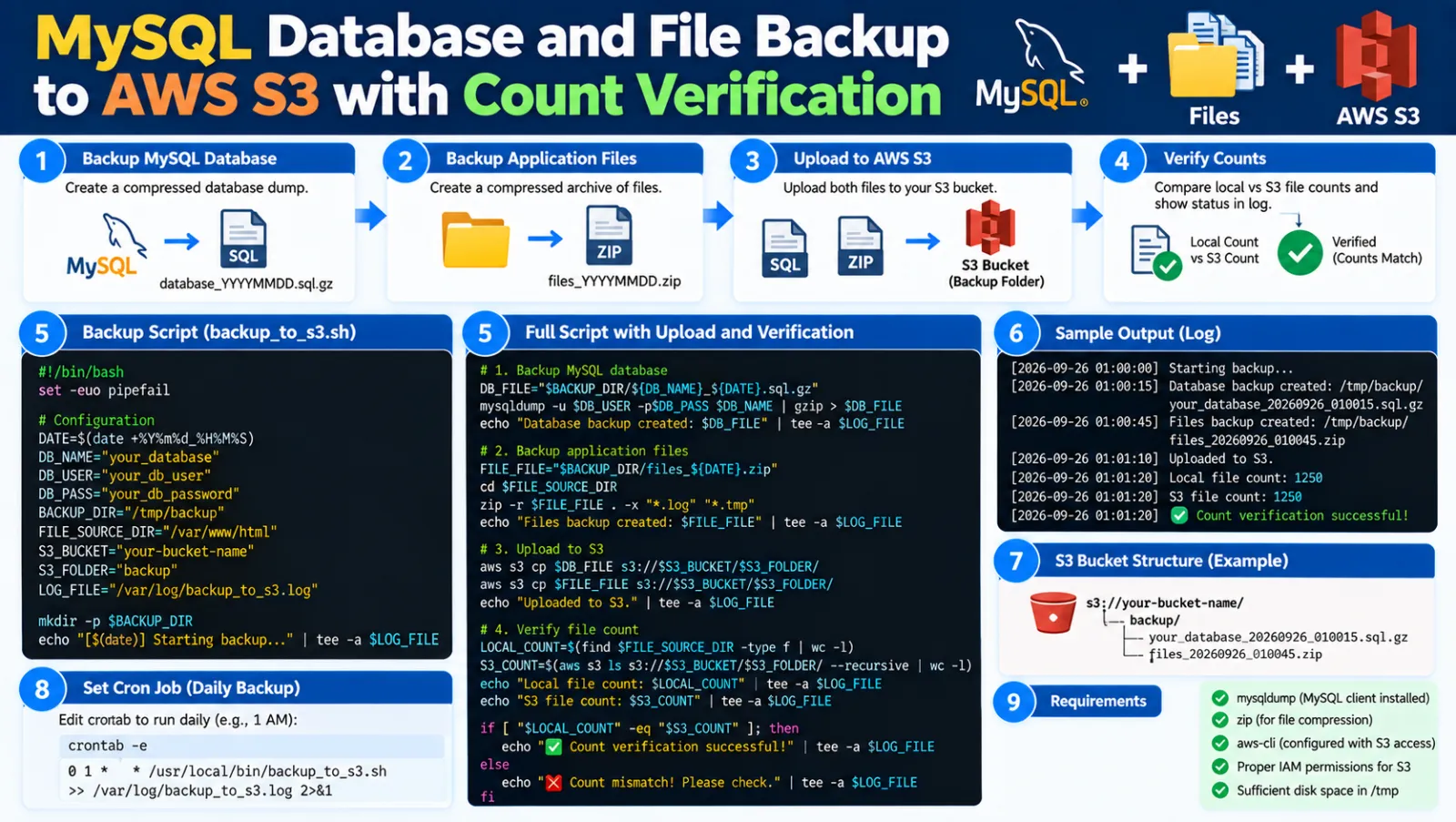
MySQL Database and File Backup to AWS S3 with Count Verification
This Bash script creates MySQL database backups, uploads them to Amazon S3, syncs selected file folders to S3, and then compares the local PDF count with the S3 PDF count for each date folder.
What This Script Does
- Backs up all application MySQL databases.
- Compresses database dumps when Gzip is enabled.
- Uploads database backups to S3.
- Syncs configured file folders to S3.
- Counts local PDF files by date folder.
- Counts matching PDF files in S3.
- Calculates the difference between local and S3 counts.
- Writes the verification report to a log file.
- Stops with an error status when a mismatch is detected.
1. Configure the Script
MYSQL_HOST="localhost"
MYSQL_USER="YOUR_MYSQL_USER"
MYSQL_PASSWORD="YOUR_MYSQL_PASSWORD"

BACKUP_ROOT="/var/www/vhost/dbbackup"
DAYS_TO_KEEP=2
GZIP=1

S3_DB_BUCKET="s3://YOUR_BUCKET/DbBackup"

LOCAL_DIRS=(
    "/var/www/vhost/domain.online/answersheets/uploads"
)

S3_PATHS=(
    "s3://YOUR_BUCKET/data-folder/"
)
The LOCAL_DIRS and S3_PATHS arrays must be in the same order. The first local directory is synced to the first S3 path, the second to the second, and so on.
2. Complete Bash Script
Save the script as backup_db_files_verify_s3.sh.
#!/bin/bash
set -euo pipefail

############################
# Configuration
############################
MYSQL_HOST="localhost"
MYSQL_USER="YOUR_MYSQL_USER"
MYSQL_PASSWORD="YOUR_MYSQL_PASSWORD"

BACKUP_ROOT="/var/www/vhost/dbbackup"
DAYS_TO_KEEP=2
GZIP=1

MYSQLDUMP_OPTIONS="--routines --triggers --single-transaction --set-gtid-purged=OFF --column-statistics=0"

S3_DB_BUCKET="s3://YOUR_BUCKET/DbBackup"

LOCAL_DIRS=(
    "/var/www/vhost/domain.online/answersheets/uploads"
)

S3_PATHS=(
    "s3://YOUR_BUCKET/data-folder/"
)

AWS=$(command -v aws)
TIMESTAMP=$(date +%Y%m%d-%H%M%S)
BACKUP_PATH="$BACKUP_ROOT/$TIMESTAMP"
BACKUP_LOG="$BACKUP_ROOT/backup-$TIMESTAMP.log"
SYNC_LOG="/var/scripts/s3_sync_count.log"

mkdir -p "$BACKUP_PATH"

log() {
    echo "[$(date '+%F %T')] $*" | tee -a "$BACKUP_LOG"
}

[ -x "$AWS" ] || {
    echo "AWS CLI not found"
    exit 1
}

START=$(date +%s)

log "========== START =========="

mysql -h "$MYSQL_HOST" \
      -u "$MYSQL_USER" \
      -p"$MYSQL_PASSWORD" \
      -e "select 1;" >/dev/null

DBS=$(mysql -N \
    -h "$MYSQL_HOST" \
    -u "$MYSQL_USER" \
    -p"$MYSQL_PASSWORD" \
    -e "show databases" |
    grep -Ev '^(information_schema|performance_schema|mysql|sys|phpmyadmin)$')

DBCOUNT=0

for db in $DBS; do

    log "Backing up $db"

    if [ "$GZIP" -eq 1 ]; then

        mysqldump \
            -h "$MYSQL_HOST" \
            -u "$MYSQL_USER" \
            -p"$MYSQL_PASSWORD" \
            $MYSQLDUMP_OPTIONS \
            "$db" |
            gzip -c > "$BACKUP_PATH/$db.sql.gz"

    else

        mysqldump \
            -h "$MYSQL_HOST" \
            -u "$MYSQL_USER" \
            -p"$MYSQL_PASSWORD" \
            $MYSQLDUMP_OPTIONS \
            "$db" \
            > "$BACKUP_PATH/$db.sql"
    fi

    DBCOUNT=$((DBCOUNT + 1))
done

log "Uploading DB backups..."

$AWS s3 sync \
    "$BACKUP_PATH" \
    "$S3_DB_BUCKET/$TIMESTAMP" \
    --storage-class STANDARD_IA \
    --only-show-errors

DB_UPLOAD_COUNT=$(
    $AWS s3 ls "$S3_DB_BUCKET/$TIMESTAMP" --recursive |
    wc -l
)

log "DB files uploaded: $DB_UPLOAD_COUNT"

find "$BACKUP_ROOT" \
    -mindepth 1 \
    -maxdepth 1 \
    -type d \
    -mtime +"$DAYS_TO_KEEP" \
    -exec rm -rf {} \;

echo "" >> "$SYNC_LOG"
echo "=========================================================" >> "$SYNC_LOG"
echo "Run: $(date)" >> "$SYNC_LOG"

GRAND_LOCAL=0
GRAND_S3=0
MISMATCH=0

for i in "${!LOCAL_DIRS[@]}"; do

    LOCAL="${LOCAL_DIRS[$i]}"
    S3="${S3_PATHS[$i]}"

    log "Syncing $LOCAL -> $S3"

    $AWS s3 sync \
        "$LOCAL" \
        "$S3" \
        --storage-class STANDARD_IA \
        --only-show-errors

    echo "" >> "$SYNC_LOG"
    echo "Source: $LOCAL" >> "$SYNC_LOG"
    printf "%-15s %10s %10s %10s\n" \
        "Date Folder" "Local" "S3" "Diff" >> "$SYNC_LOG"

    SRC_LOCAL=0
    SRC_S3=0

    shopt -s nullglob

    for folder in "$LOCAL"/20??-??-??; do

        [ -d "$folder" ] || continue

        DATE=$(basename "$folder")

        LC=$(
            find "$folder" \
                -type f \
                -iname "*.pdf" |
            wc -l
        )

        SC=$(
            $AWS s3 ls "${S3}${DATE}/" --recursive |
            awk 'tolower($4) ~ /\.pdf$/ {c++} END {print c+0}'
        )

        DF=$((LC - SC))

        printf "%-15s %10d %10d %10d\n" \
            "$DATE" \
            "$LC" \
            "$SC" \
            "$DF" >> "$SYNC_LOG"

        SRC_LOCAL=$((SRC_LOCAL + LC))
        SRC_S3=$((SRC_S3 + SC))

        if [ "$DF" -ne 0 ]; then
            MISMATCH=1
        fi
    done

    printf "%-15s %10d %10d %10d\n" \
        "TOTAL" \
        "$SRC_LOCAL" \
        "$SRC_S3" \
        "$((SRC_LOCAL - SRC_S3))" >> "$SYNC_LOG"

    GRAND_LOCAL=$((GRAND_LOCAL + SRC_LOCAL))
    GRAND_S3=$((GRAND_S3 + SRC_S3))
done

echo "=========================================================" >> "$SYNC_LOG"
echo "Databases : $DBCOUNT" >> "$SYNC_LOG"
echo "Local PDFs: $GRAND_LOCAL" >> "$SYNC_LOG"
echo "S3 PDFs   : $GRAND_S3" >> "$SYNC_LOG"
echo "Difference: $((GRAND_LOCAL - GRAND_S3))" >> "$SYNC_LOG"
echo "Time(sec) : $(( $(date +%s) - START ))" >> "$SYNC_LOG"

if [ "$MISMATCH" -eq 0 ]; then
    log "Verification successful."
else
    log "WARNING: Count mismatch detected."
    exit 2
fi

log "========== COMPLETED =========="
3. Database Backup
The script checks MySQL and discovers application databases. System databases are excluded.
mysql -N -h "$MYSQL_HOST" -u "$MYSQL_USER" -p"$MYSQL_PASSWORD" \
-e "show databases" |
grep -Ev '^(information_schema|performance_schema|mysql|sys|phpmyadmin)$'
Each remaining database is dumped into the timestamped backup directory.
20260918-173200/
├── database1.sql.gz
├── database2.sql.gz
└── database3.sql.gz
4. Upload Database Backups to S3
aws s3 sync \
    "$BACKUP_PATH" \
    "$S3_DB_BUCKET/$TIMESTAMP" \
    --storage-class STANDARD_IA \
    --only-show-errors
The database backup files are stored under a timestamped S3 folder.
5. Sync Application Files
aws s3 sync \
    "$LOCAL" \
    "$S3" \
    --storage-class STANDARD_IA \
    --only-show-errors
This synchronizes each configured local directory to its corresponding S3 location.
6. Compare Local and S3 PDF Counts
For each date folder, the script counts local PDF files:
find "$folder" -type f -iname "*.pdf" | wc -lThen it counts PDF objects in the matching S3 date folder:
aws s3 ls "${S3}${DATE}/" --recursive |
awk 'tolower($4) ~ /\.pdf$/ {c++} END {print c+0}'
The difference is calculated as:
Difference = Local PDF Count - S3 PDF Count7. Example Verification
Date Folder        Local        S3       Diff
2026-09-15           1250       1250          0
2026-09-16           1432       1432          0
2026-09-17           1510       1508          2
TOTAL                4192       4190          2
If the difference is not zero, the script marks the run as a mismatch.
8. Verification Result
When all counts match:
Verification successful.When at least one folder has a mismatch:
WARNING: Count mismatch detected.The script exits with status code 2 in that case, which is useful when the script is called from cron, monitoring, or another automation system.
9. Verification Log
The count report is stored in:
/var/scripts/s3_sync_count.logThe database backup log is stored under:
/var/www/vhost/dbbackup/10. Important Folder Structure
The PDF verification section expects date folders matching:
YYYY-MM-DDFor example:
uploads/
├── 2026-09-15/
├── 2026-09-16/
└── 2026-09-17/
Each date folder is compared with the corresponding S3 folder.
11. Make the Script Executable
chmod +x backup_db_files_verify_s3.sh12. Run the Backup
sudo ./backup_db_files_verify_s3.shQuick Reference
# Make executable
chmod +x backup_db_files_verify_s3.sh

# Run
sudo ./backup_db_files_verify_s3.sh
Important Notes
- Make sure AWS CLI is installed and authenticated.
- The AWS identity needs permission to list and upload the required S3 objects.
- The MySQL user needs permission to read the databases being backed up.
LOCAL_DIRSandS3_PATHSmust have matching indexes.- The current PDF verification logic checks only folders matching
YYYY-MM-DD. - A count match confirms object counts, not that every local file has identical content.
- Test a real restore periodically to verify that backups are usable.
Conclusion
This workflow combines database backup, file synchronization, S3 upload, and post-upload PDF count verification in one script. It provides a simple way to identify missing or extra PDF objects after an S3 sync.
Discussion (0)