
Send Bulk Email with a 60-Second Pause Using Python and AWS SES
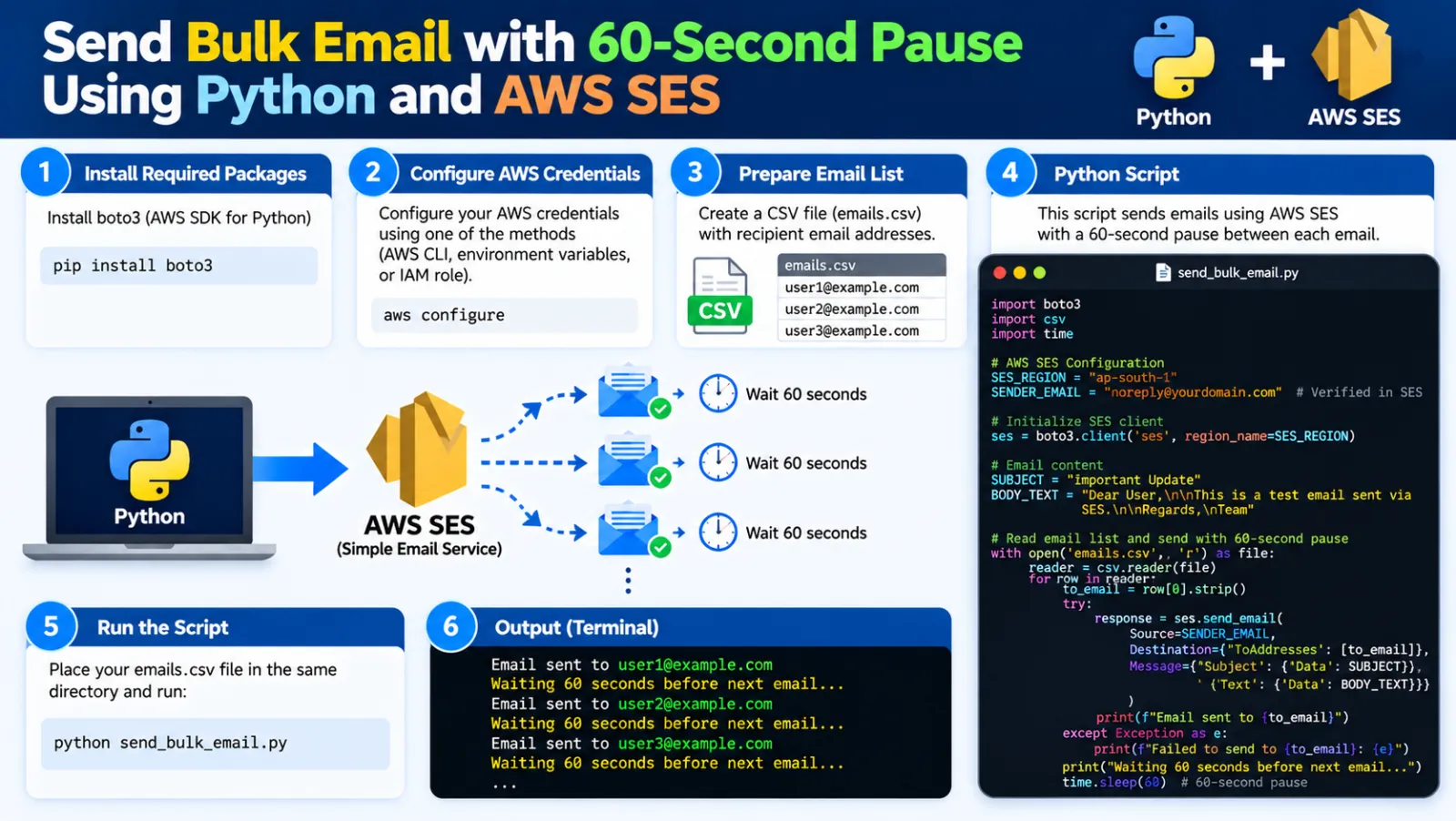
Send Bulk Email with a 60-Second Pause Using Python and AWS SES
This Python script sends emails from a recipient list in batches. After each batch, it waits 60 seconds before starting the next batch. The script also creates a log file containing successful and failed send attempts.
What This Script Does
- Connects to AWS SES using SMTP.
- Reads email addresses from
list_of_emails.txt. - Sends emails in batches.
- Processes up to
1500emails in one batch. - Waits
60 secondsbefore the next batch. - Logs successful and failed sends.
1. Prepare the Files
BulkEmail/
├── send_mail_with_60_second_pause.py
├── list_of_emails.txt
└── email_send_status.txt
2. Create the Email List
Add one recipient email address per line:
user1@example.com
user2@example.com
user3@example.com
3. Configure AWS SES
aws_smtp_server = "email-smtp.ap-south-1.amazonaws.com"
aws_smtp_port = 587

aws_smtp_username = "YOUR_SES_SMTP_USERNAME"
aws_smtp_password = "YOUR_SES_SMTP_PASSWORD"

sender_email = "Customer Helpdesk <helpdesk@yourdomain.com>"
Use the SMTP endpoint for the AWS SES Region you are sending through.
4. Configure Batch Size and Pause
batch_size = 1500
pause_seconds = 60
In this example, the script sends up to 1500 emails, then waits 60 seconds before processing the next batch.
For example, with 3200 recipients:
Batch 1 → 1500 emails
Wait    → 60 seconds

Batch 2 → 1500 emails
Wait    → 60 seconds

Batch 3 → 200 emails
5. Complete Python Script
Save the following as send_mail_with_60_second_pause.py:
import smtplib
from email.mime.multipart import MIMEMultipart
from email.mime.text import MIMEText
from datetime import datetime
import time

# AWS SES SMTP settings
aws_smtp_server = "email-smtp.ap-south-1.amazonaws.com"
aws_smtp_port = 587
aws_smtp_username = "YOUR_SES_SMTP_USERNAME"
aws_smtp_password = "YOUR_SES_SMTP_PASSWORD"

sender_email = "Customer Helpdesk <helpdesk@yourdomain.com>"

# Email subject and body
subject = "Reminder to Complete Registration"

body = """
<html>
<body style="font-family: Arial, sans-serif; font-size: 14px; color: #000;">
<p>Dear Candidate,</p>

<p>
This is a reminder to complete your online registration.
Please complete all required steps before the registration closing date.
</p>

<p>
This is an auto-generated email. Please do not reply to this message.
</p>

<p>
Regards,<br>
<b>Customer Helpdesk</b>
</p>
</body>
</html>
"""

# Output log
output_file = "email_send_status.txt"

# Batch settings
batch_size = 1500
pause_seconds = 60


def send_email(to_email):
    msg = MIMEMultipart()

    msg["From"] = sender_email
    msg["To"] = to_email
    msg["Subject"] = subject

    msg.attach(MIMEText(body, "html"))

    with smtplib.SMTP(
        aws_smtp_server,
        aws_smtp_port
    ) as server:

        server.starttls()

        server.login(
            aws_smtp_username,
            aws_smtp_password
        )

        server.send_message(msg)


# Read email list
with open("list_of_emails.txt", "r") as file:
    all_emails = [
        email.strip()
        for email in file
        if email.strip()
    ]

total_emails = len(all_emails)

print(f"Total emails to send: {total_emails}")


# Send emails in batches
with open(output_file, "a") as output:

    for i in range(0, total_emails, batch_size):

        batch = all_emails[i:i + batch_size]

        batch_number = i // batch_size + 1

        print(
            f"\n--- Sending batch {batch_number} "
            f"({len(batch)} emails) ---"
        )

        for email in batch:

            try:
                send_email(email)

                status = (
                    f"{datetime.now():%Y-%m-%d %H:%M:%S} - "
                    f"Email sent successfully to {email}"
                )

                print(status)
                output.write(status + "\n")

            except Exception as e:

                status = (
                    f"{datetime.now():%Y-%m-%d %H:%M:%S} - "
                    f"Failed to send email to {email}: {e}"
                )

                print(status)
                output.write(status + "\n")

        # Save log after each batch
        output.flush()

        # Wait before the next batch
        if i + batch_size < total_emails:

            print(
                f"Waiting {pause_seconds} seconds "
                f"before next batch..."
            )

            time.sleep(pause_seconds)


print("\nAll emails processed.")
print(f"Check {output_file} for details.")
6. How It Works
Read the Email List
with open("list_of_emails.txt", "r") as file:The script loads the recipient addresses and ignores empty lines.
Send a Single Email
server.starttls()
server.login(
    aws_smtp_username,
    aws_smtp_password
)
server.send_message(msg)
The script connects to the AWS SES SMTP server, enables TLS, authenticates, and sends the message.
Process Batches
for i in range(0, total_emails, batch_size):This splits the recipient list into batches of the configured size.
Wait Between Batches
time.sleep(pause_seconds)This pauses the script for 60 seconds before the next batch.
Save the Log
output.flush()The log is flushed after each batch so the latest status is written to disk.
7. Run the Script
python send_mail_with_60_second_pause.py8. Example Output
Total emails to send: 3200

--- Sending batch 1 (1500 emails) ---

2026-09-18 14:30:10 - Email sent successfully to user1@example.com
2026-09-18 14:30:11 - Email sent successfully to user2@example.com

Waiting 60 seconds before next batch...

--- Sending batch 2 (1500 emails) ---

Waiting 60 seconds before next batch...

--- Sending batch 3 (200 emails) ---
Quick Reference
# Run the script
python send_mail_with_60_second_pause.py
Important Notes
- Keep AWS SES SMTP credentials secret.
- Verify the sender identity in AWS SES.
- Follow your SES account's sending quota and rate limits.
- Use only legitimate, permission-based recipient lists.
- Monitor bounces, complaints, and delivery failures.
Conclusion
Batch processing with a pause can make a bulk-email script easier to control. In this example, the script sends up to 1500 emails, waits 60 seconds, and then continues with the next batch while keeping a send-status log.
Discussion (0)